
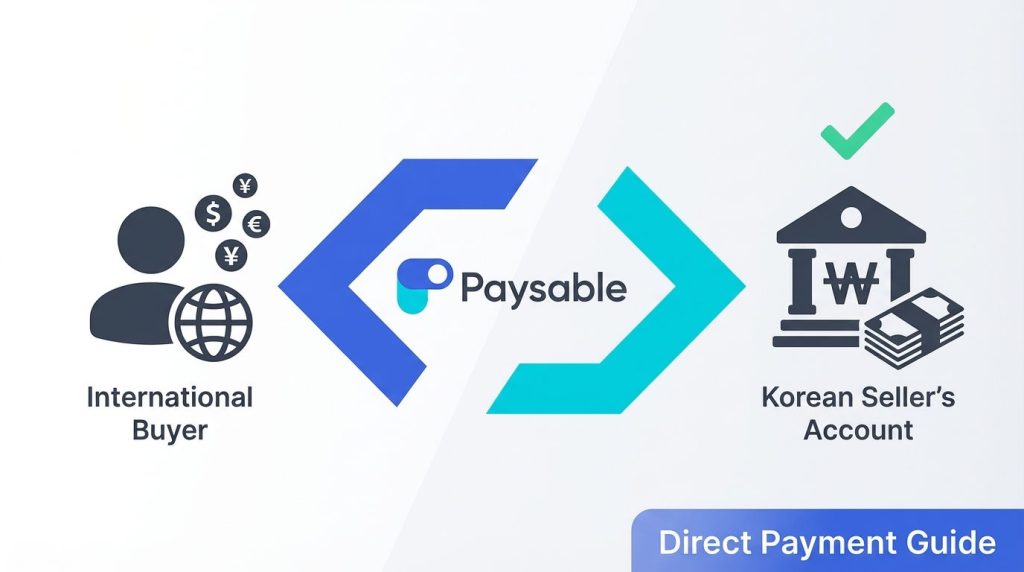
“I completed my order on a Korean shopping mall, but the only payment option is ‘bank transfer’…”
If you’ve ever tried buying Korean products from overseas, you’ve probably run into this situation at least once. Paysable’s Direct Payment is designed exactly for moments like these. Even without a Korean bank account, Paysable handles the Korean won transfer to the seller on your behalf.
→ Don’t worry! This guide walks first-time users through everything — from what Direct Payment is to how to actually use it, step by step.
🤔 What Is Direct Payment?
Direct Payment is a payment proxy service where Paysable transfers money to a Korean seller’s bank account on your behalf when they require a Korean bank transfer.
When to Use It
- When a Korean online store only accepts bank transfer as a payment method
- When buying K-pop merchandise from individual sellers on Twitter/Instagram
- When you need to transfer money for a secondhand deal on Bunjang (Korean marketplace)
- When you’ve ordered albums for a Korean fansign event and the seller requests a bank transfer
Key Points at a Glance
Table 1. Direct Payment Service Overview
| Item | Details |
|---|---|
| What does it do? | Transfers money to a Korean seller’s bank account on your behalf |
| Where? | Paysable website |
| How long does it take? | Typically completed in 5 seconds after payment |
| Service fee? | Starting from ₩1,000 depending on the amount (details below) |
💡 Direct Payment = Payment proxy service. You place the order yourself, and Paysable only handles the Korean bank transfer that the seller requires.
📋 How to Use Direct Payment
Direct Payment process: Sign Up → Enter Recipient Account → Review Payment Info → Payment Complete
Step 1: Sign Up for Paysable ✅
If you don’t have a Paysable account yet, you’ll need to create one first.
How to: 1. Go to the Sign Up page 2. Enter your email, password, and basic information 3. Complete the email verification
Once registered, you can check your Personal Code on My Page. This code is also needed when using the forwarding service later — you can find it on My Page whenever you need it.
💡 Tip: Your Personal Code looks like
#00000-A. You can find it at My Page > My Warehouse Address.
Step 2: Top Up Paysable Credits 💰 (Optional)
If you want to pay with Paysable Credits, topping up in advance is convenient. It’s not required — you can also pay directly with a card or PayPal at the Step 3 checkout.
How to: 1. Go to the Top Up page 2. Enter the amount you want to charge 3. Select a payment method and complete the transaction
💡 Tip: Topping up in advance is faster if you plan to make payments frequently. For one-off payments, you can simply pay at Step 3.
Step 3: Submit a Direct Payment Request 📝
Go to the Direct Payment page and click New Request. The checkout proceeds in two short stages.
3-1. Enter the Recipient’s Account
Enter the account information exactly as the seller provided.
- Account number — exactly as the seller provided
- Bank — pick from the dropdown (24 banks supported: Kakao Bank, Toss Bank, K Bank, KB Kookmin, Shinhan, Woori, Hana, NH NongHyup, and more)
- Payment amount (KRW) — matching the amount the seller requested
After filling these in, click Confirm Recipient. Paysable automatically validates that the account exists.
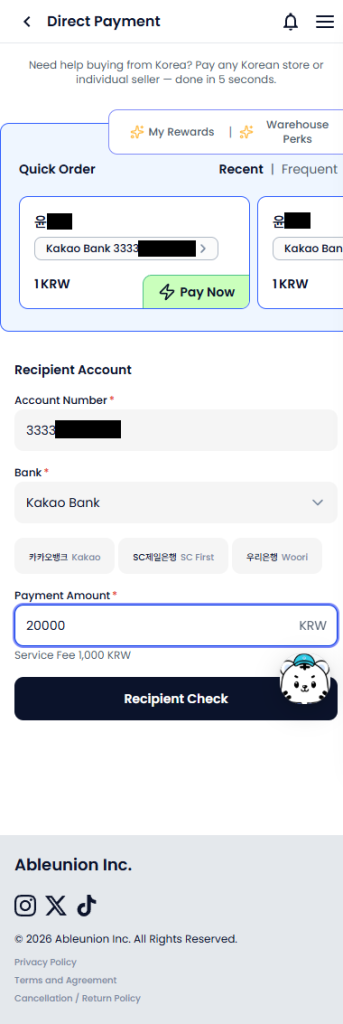
Enter Recipient Account screen: enter the account number, bank, and payment amount accurately, then click Confirm Recipient — the system validates the account
3-2. Review Payment Info and Pick a Processing Option
Once validated, you’ll move on to the payment review screen.
- Recipient — auto-filled from the previous step (use “Change” if needed)
- Amount / Fee — calculated and shown automatically
- Buyer Name (your name) — your own name is pre-filled. Edit it if you need a different sender name
- Memo (optional) — add a note for the seller if needed
- Processing option — pick one:
- Buy & Ship ✨ (Recommended) — pay via Direct Payment and ship the items to Paysable’s warehouse to earn an extra 300 KRW credit
- Payment Only — just pay, no extra reward
Finally, click Pay Now to process the transfer.
Important: – ⚠️ Enter the recipient’s account number and bank exactly as the seller provided – ⚠️ The payment amount must match the seller’s requested amount precisely – ⚠️ The buyer name field is for your own name, not the seller’s name
💡 Tip: Save a screenshot of the seller’s bank details to avoid input errors.
For a more detailed walkthrough, you can also check the Direct Payment Guide.
Step 4: Confirm the Transfer ✅
Once you tap Pay Now, Paysable transfers the funds to the seller’s account right away.
How to check: 1. Open the Direct Payment page — all your transactions are listed there 2. Use the top tabs (All / Completed / Pending / Cancelled) to filter by status 3. Once the transfer shows as Completed, let the seller know
💡 Tip: Sending the seller a quick “I’ve transferred the payment” message after confirmation can speed up the shipping process.
🔄 Direct Payment vs Manual Purchase: Which One Should You Choose?
In addition to Direct Payment, Paysable also offers a Manual Purchase service. Since each fits different situations, it’s helpful to know the differences.
Table 2. Direct Payment vs Manual Purchase
| Category | Direct Payment | Manual Purchase |
|---|---|---|
| What it does | Transfers money to the seller’s account | Handles the entire order and payment on your behalf |
| What you do | Place the order yourself; Paysable handles the transfer only | Just share the product link |
| Best for | When bank transfer is the only option | When ordering in Korean is difficult |
| Processing time | Typically within 5 seconds | Processed by staff during business hours |
| Service fee | Starting from ₩1,000 | Starting from ₩2,500 |
Want to learn more about Manual Purchase? Check out the Manual Purchase First-Time User Guide as well.
💰 Service Fee
Direct Payment fees vary depending on the transfer amount.
Table 3. Direct Payment Service Fee
| Transfer Amount | Fee |
|---|---|
| Up to ₩50,000 | ₩1,000 |
| ₩50,001 – ₩300,000 | ₩2,000 |
| ₩300,001 and above | ₩2,500 |
ℹ️ Note: Fees are subject to change. Please check the Service Fee page for the latest information.
Real-world examples: – 1 K-pop album (₩20,000) → Fee ₩1,000 → Total ₩21,000 – Photocard (₩50,000) → Fee ₩1,000 → Total ₩51,000 – Bulk fansign album order (₩350,000) → Fee ₩2,500 → Total ₩352,500
❓ Frequently Asked Questions
Q. Does the transfer go through immediately?
A. Once you tap Pay Now, the transfer is typically completed within 5 seconds. However, there may be slight delays depending on bank maintenance hours or system conditions. If your payment stays in “Pending” for an extended time, check the “Pending” tab on the Direct Payment page and contact 1:1 Inquiry with your transaction ID if it doesn’t resolve.
Q. How does my name appear to the seller?
A. The deposit appears under the Buyer Name you entered when you submitted your Direct Payment request. Your own name is pre-filled by default, so if the seller is expecting a different name — the name on your order, for example — edit the Buyer Name field at Step 3-2 before you pay. Matching it to what the seller expects is the easiest way to avoid any confusion.
Q. Can I cancel after the transfer is made?
A. Once the funds have been transferred to the seller’s account, Paysable cannot directly reverse the transaction. You would need to arrange a refund directly with the seller. If the transfer hasn’t been made yet, you can request a cancellation through 1:1 Inquiry.
Q. How do I receive a refund from the seller?
A. If a seller needs to issue a refund, they’ll need Paysable’s refund account details. Contact 1:1 Inquiry with your transaction ID to request the refund account information. Once the seller sends the refund to that account, the amount will be credited back to your Paysable Credits balance after confirmation.
Q. Where does the product get shipped after Direct Payment?
A. Since Direct Payment is a transfer proxy service, the shipping address is set by you when placing the order. If you set Paysable’s Korean Warehouse address as the delivery destination, you can then use the international forwarding service to receive it overseas. Picking the Buy & Ship option at Step 3-2 also earns you 300 KRW credit when the item arrives at the warehouse.
Curious about the international shipping process? Check out the Korean Address & International Forwarding Guide.
Q. Can I use it even if I don’t speak Korean?
A. Paysable’s website supports multiple languages. Since you only need to enter the bank, account number, and amount for a Direct Payment request, you can use it without knowing Korean. If you need further assistance, check the FAQ or reach out via 1:1 Inquiry.
⚠️ Safety Tips for Private Transactions
Direct Payment is commonly used when sending money to individual sellers on Twitter, Instagram, and other social media platforms. However, since Direct Payment is a transfer proxy service, it does not guarantee the safety of the transaction itself.
Please keep the following in mind when trading with individual sellers:
- ⚠️ Verify the seller’s credibility before paying — Check their transaction history, account age, and reviews from other buyers
- ⚠️ Keep records of your conversation and transaction details — Save screenshots of order details, agreed amounts, and seller information in case any issues arise
- ⚠️ If the seller stops responding after payment — Paysable only handles the bank transfer and cannot directly mediate disputes between buyers and sellers. If you suspect fraud, please report it through 1:1 Inquiry
💡 Tip: For safer transactions, consider using platforms like Bunjang that support escrow (secure payment) systems.
📌 Summary: Get Started Now
Here’s a quick recap of the key points:
- ✅ Pay without a Korean bank account — Paysable transfers to the seller’s account on your behalf
- ✅ Simple process — Sign Up → Enter Recipient Account → Review Payment Info → Done
- ✅ Fast processing — Typically completed within 5 seconds once you tap Pay Now
- ✅ Transparent fees — Starting from ₩1,000, capped at ₩2,500
If you’ve ever given up on a Korean product because of bank transfer requirements, give Direct Payment a try.