
“You found the perfect item, but the seller says, ‘I only accept bank transfers’?”
If you shop online in Korea while living abroad, you’ve probably run into sellers who refuse cards and PayPal and accept only a deposit into a Korean bank account (bank transfer or virtual account). This is especially common with small sellers of K-pop merchandise, individuals listing limited editions, and smaller Korean shops. For an overseas resident without a Korean bank account, it can feel like a “closed door.”
→ This situation is easier to solve than you might think. With Paysable Direct Payment, you can pay a Korean seller by bank transfer from overseas — no Korean account required.
In this guide, we’ll walk through why some Korean sellers accept only bank transfers, how Paysable Direct Payment handles that payment for you, and how it connects to the Warehouse (forwarding service) to save on shipping.
1. Why Do Korean Sellers Accept “Bank Transfer Only”? 🏦
First, let’s look at why payments get blocked. Many small Korean sellers and individuals operate around domestic transactions, so overseas shoppers often hit the following friction:
- No card payments: Individual sellers and small shops often don’t have card-payment infrastructure, so they frequently accept only a bank transfer or virtual account deposit into a Korean account.
- Foreign cards declined: Even when cards are accepted, a foreign-issued card can be declined automatically if the cardholder name, billing address, or payment currency doesn’t match.
- The bank-transfer barrier: The biggest obstacle is the deposit itself. Without a Korean bank account, there’s no easy way to make a bank transfer or virtual account deposit.
- Timing: Limited editions and secondhand deals are often first-come, first-served, so an item can sell out while you’re still looking for a way to pay.
ℹ️ Note: Sellers who accept only bank transfers usually aren’t trying to block overseas customers — they’re simply set up for domestic transactions. If your payment is blocked, it’s often not your fault.
To ease this friction, the payment-proxy model emerged, and Paysable Direct Payment is a service that handles the Korean bank transfer for you.
2. How Direct Payment Solves It ✅
Paysable Direct Payment is a payment-proxy service that handles the bank transfer to the seller on your behalf when a Korean seller asks for a deposit into a Korean account. Because it runs as an automated payment without manual staff handling, it’s fast — and you can use it even without a Korean account or a Korean card.
How it works:
- (One time) Identity verification: On your first use, you complete a one-time identity verification with a government-issued ID.
- Enter the account details (bank and account number) and the payment amount the seller gave you. Paysable checks that the account is valid.
- Enter your payment details and check out. If you select the Buy & Ship option here, you can earn bonus points later when you import the seller’s item into the Paysable Warehouse.
- The payment is processed within seconds, and the seller proceeds with your order right away.
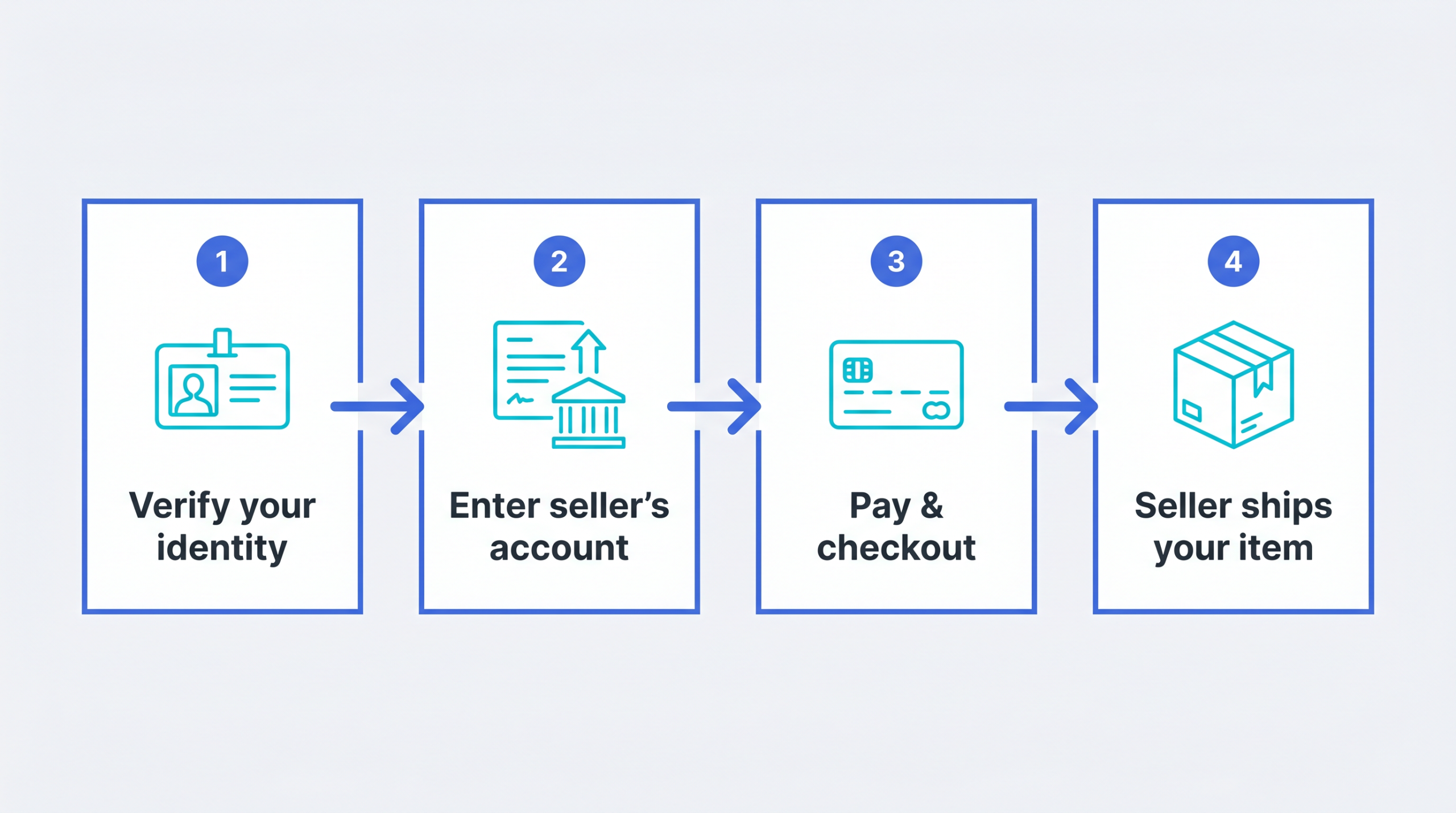
Direct Payment is a feature offered across the industry, but Paysable stands out for its simple fee structure and one-stop connection to the Warehouse. You don’t have to arrange payment and shipping separately — it all flows in one app. Payments can be made with overseas methods such as PayPal, and since the renewal you can pay in your own currency — EUR, CAD, AUD, MXN, and more — in addition to USD.
One-Time Identity Verification 🪪
The first time you use Direct Payment, you’ll complete a one-time identity verification with a government-issued ID. This is a step for safer transactions, and once verified, you can use the service for later payments without verifying again.
- Enter your name + upload your ID: Enter your first and last name and upload an image of your government-issued ID.
- Match your PayPal name: The name on your ID must match the name on the PayPal account you’ll use to pay. It’s a good idea to confirm which PayPal account you’ll use before paying.
- Review time: Verification requests are usually reviewed within 24 hours. If additional verification is needed, you’ll be contacted separately.
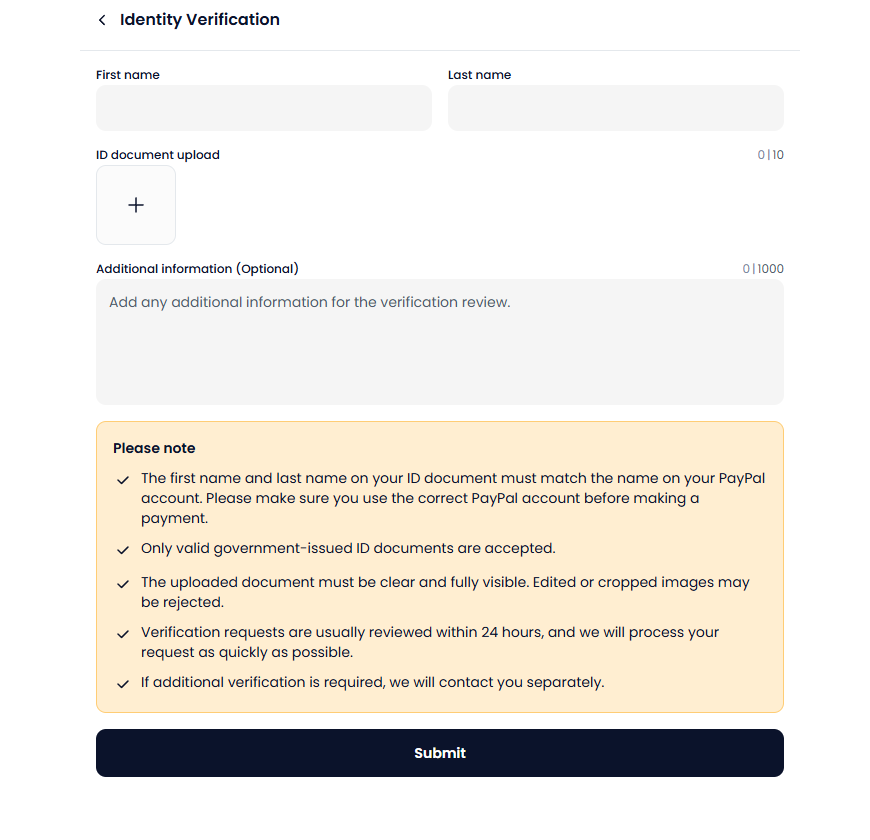
ℹ️ Tip: Upload a clear, fully visible image of your ID. Edited or cropped images may be rejected during review. To pay in time for a comeback or release, it’s best to complete verification in advance.
ℹ️ Note: Direct Payment sends the payment to the account the seller provided. Double-checking the account number, bank, and amount when you apply helps everything go smoothly.
3. Fees at a Glance 💳
Since the renewal (April 2026), Direct Payment fees have been simplified into three tiers. It’s a simple structure: a flat fee per transaction based on the payment amount.
Table 1. Paysable Direct Payment fees (by payment amount tier)
| Payment amount | Fee (per transaction) |
|---|---|
| Up to 50,000 KRW | 1,000 KRW |
| 50,001 – 300,000 KRW | 2,000 KRW |
| 300,001 KRW and above | 2,500 KRW |
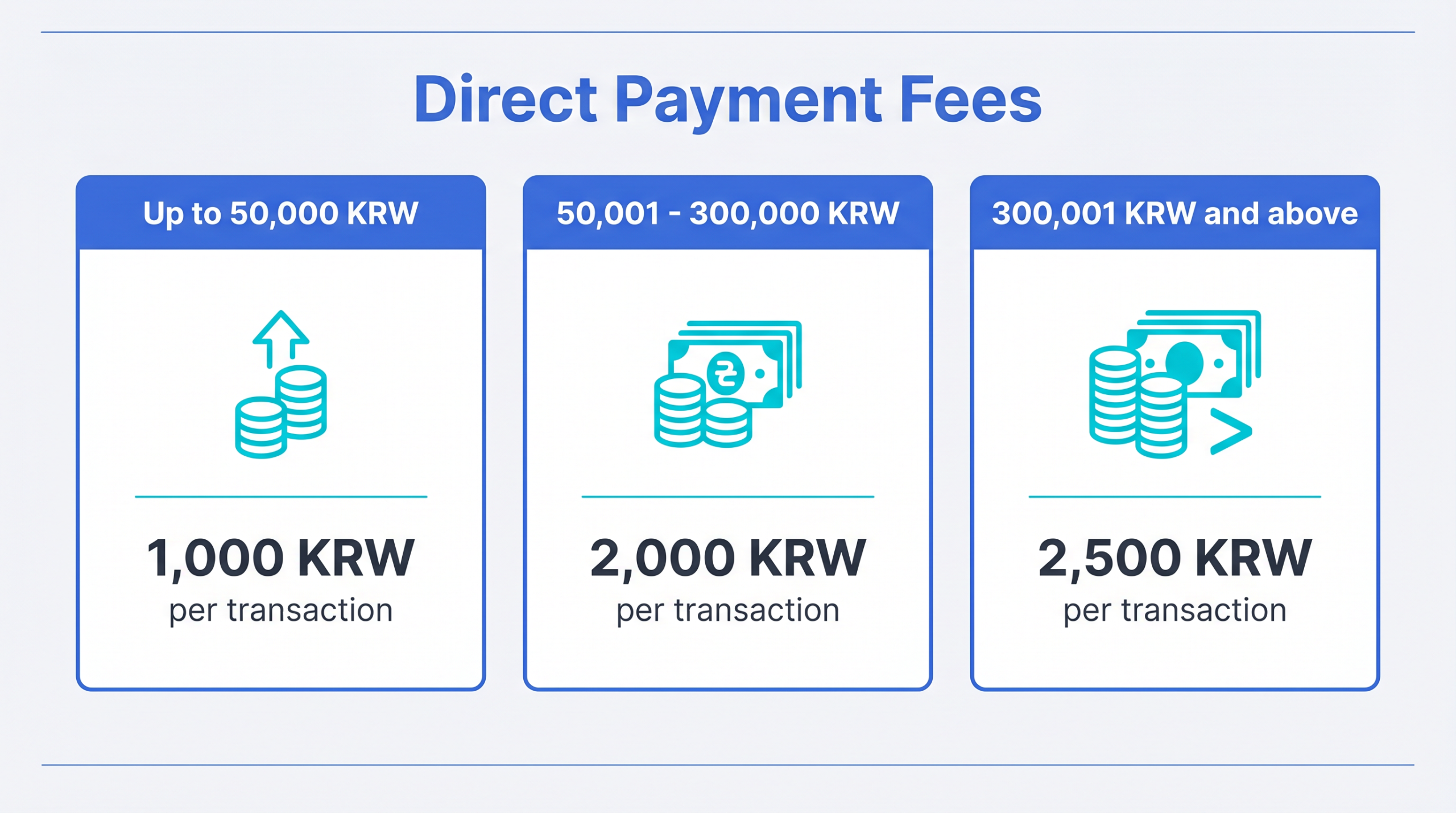
The simple structure makes it easy to estimate your total cost before paying. For example, paying for a 200,000 KRW item costs a 2,000 KRW fee per transaction.
ℹ️ Note: Fees and policies may change. Check the latest itemized rates on the pricing page.
4. Buy & Ship — Connecting Payment and Delivery 📦
The real value of Direct Payment is that it doesn’t stop at payment — it flows naturally into delivery. Direct Payment handles making the payment (deposit) to the seller, and from there, the items the seller ships are gathered at the Paysable Warehouse and sent overseas. Selecting the Buy & Ship option when you pay adds a bonus to this connection.
Benefits of Buy & Ship
- Bonus points: Select Buy & Ship at payment, then import the item you received from the seller into the Paysable Warehouse. When that import is matched to the corresponding Direct Payment, you earn 300 KRW in event cash.
- Up to 1 year of free storage: Imported items are stored free for up to a year. This is useful when you want to gather items with different release dates and send them together. You can check stored packages anytime in your Package List.
Save on Shipping with Consolidated Shipping
Sending several packages separately means paying shipping each time, but with consolidated shipping you can bundle multiple packages stored in the Warehouse into a single box. Compared with sending them individually, you save significantly on shipping and simplify down to a single tracking number. You can choose carriers such as UPS, DHL, EMS, and K-Packet, and preview real-time quotes with the Shipping Fee Calculator.
ℹ️ Note: Even with consolidated shipping, import and forwarding fees apply per package. While items are in storage, you can also choose add-on services such as Package Check (photo/video), vacuum packing, and Customizing.
If you’d like to browse several official Korean shops in one app, check out the Paysable Store guide, which works through the same flow.
5. When Direct Payment Fits Best 🎯
Direct Payment isn’t needed for every purchase, but it fits especially well in situations like these:
- When the seller accepts bank transfer only: Paying a small seller or individual who can take only a bank transfer or virtual account deposit.
- When the seller’s account and amount are set: When the recipient’s bank and account number and the payment amount are clear, so only the payment (deposit) needs to be handled for you.
- When fast, automated handling matters: When payment timing is critical, as with limited editions or first-come deals.
On the other hand, when a seller doesn’t accommodate global buyers and staff need to handle the ordering and option selection for you, Manual Purchase is a better fit. For tips on secondhand deals like Bunjang, see the Bunjang photocard buying guide.
💡 Tip: If the difference between Direct Payment and Manual Purchase is confusing, think of it as “Do you only need the payment handled? (Direct Payment)” vs. “Does the whole purchasing process need to be handled for you? (Manual Purchase).”
When you’re ready, you can start Direct Payment right away below.
6. Frequently Asked Questions (FAQ) ❓
Q. Can I use it without a Korean bank account?
A. Yes, you can. Direct Payment was built for overseas residents who don’t have a Korean account: when you pay with an overseas method such as PayPal, Paysable handles the bank transfer to the Korean seller for you. Since the renewal, you can also pay in your own currency — EUR, CAD, AUD, MXN, and more — in addition to USD. You can check the sign-up steps on the Join page.
Q. Why is ID verification required?
A. For safer transactions, you complete a one-time identity verification with a government-issued ID the first time you use Direct Payment. The name on your ID must match the name on the PayPal account you’ll use to pay, and verification requests are usually reviewed within 24 hours. Once verified, you can use the service for later payments without verifying again.
Q. How is Direct Payment different from Manual Purchase?
A. Direct Payment automatically handles only the payment (deposit) for you, while Manual Purchase has staff handle the ordering process as well. If your item and amount are set and you only need the deposit made, Direct Payment fits; if the ordering process itself is complex, Manual Purchase fits.
Q. How do I receive what I paid for?
A. After payment, the seller ships the item. If you selected the Buy & Ship option at payment and import the item you received from the seller into the Paysable Warehouse, you earn 300 KRW in event cash when that import is matched to the corresponding Direct Payment. From there, when you request shipping, pick the packages you want sent to your overseas address — and bundling several together with consolidated shipping saves on shipping costs.
Q. When are the fees charged?
A. The Direct Payment fee is 1,000 – 2,500 KRW per transaction depending on the payment amount tier. Warehouse import fees and overseas shipping are billed separately when you request shipping. You can check itemized rates on the pricing page.
7. Wrapping Up — Don’t Let “Bank Transfer Only” Stop You 🎁
A Korean seller accepting only bank transfers doesn’t mean you have to give up. With Paysable Direct Payment, the following flow becomes possible in one app:
- Pay a Korean seller by bank transfer from overseas — without a Korean account
- A simplified three-tier fee (1,000 – 2,500 KRW per transaction) for predictable costs
- Buy & Ship — import into the Warehouse to earn a 300 KRW event cash bonus
- Up to 1 year of free storage + consolidated shipping to save on delivery
To avoid getting stuck on your next limited-edition or merchandise payment, it’s a good idea to sign up in advance.
For more, check the FAQ or reach out through 1:1 Inquiry.