
“Have you ever filled your cart, only to get stuck at checkout or run into a ‘no international shipping’ notice?”
When you shop at Korean online stores from overseas, it’s often not just payment that gets blocked — sometimes the ordering process itself won’t go through. This happens with Korean stores that don’t accept foreign payment methods, don’t ship internationally, or require Korean phone verification. That’s exactly when a Korean shopping proxy service helps — someone buying the item from that store on your behalf. Paysable Manual Purchase is a service where a Paysable staff member buys Korean products you can’t order yourself.
In this guide, we’ll walk through why some Korean stores can’t be ordered from overseas, how Manual Purchase handles the purchase for you, and how connecting it with the Warehouse (forwarding) ties storage and shipping together in one place.
1. Why Does Direct Ordering Get Blocked from Overseas? 🛒
First, let’s look at why orders don’t go through. Many Korean stores and sellers operate with domestic customers in mind, so overseas users often run into the following friction.
- No foreign payment methods: Many stores only accept Korea-issued cards or domestic quick-pay options, so overseas cards and PayPal get blocked at checkout.
- No international shipping: Even if payment goes through, you often can’t set an overseas delivery address — only a Korean address works.
- The Korean identity verification wall: Sign-up or checkout may require Korean phone number verification, i-PIN, and similar steps that are hard for overseas users to pass.
- Complicated ordering steps: Option selection, Korean-only screens, and fan-club-members-only sales can make the ordering process itself tricky.
ℹ️ Note: These restrictions usually aren’t meant to keep overseas customers out — stores are simply set up for domestic transactions in Korea. If your order gets blocked, it’s rarely something on your end.
A proxy purchase model is what resolves all this friction at once, and Paysable Manual Purchase is a service where staff buy hard-to-order products on your behalf.
2. How Manual Purchase Solves It ✅
Paysable Manual Purchase is a proxy purchase service where, at Korean stores that aren’t built for global buyers, a Paysable staff member places the order itself for you. The key point is that it doesn’t just handle payment — you can hand over the entire purchase process, from finding the product and selecting options to ordering and paying.
How it works:
- Fill out the order form: Enter the details needed to buy — store name, product URL, product name, price, options, and so on.
- We review and buy for you: Paysable reviews your order and purchases the item on your behalf.
- Imported to the warehouse: The purchased item arrives at the Paysable Warehouse, ready to ship.
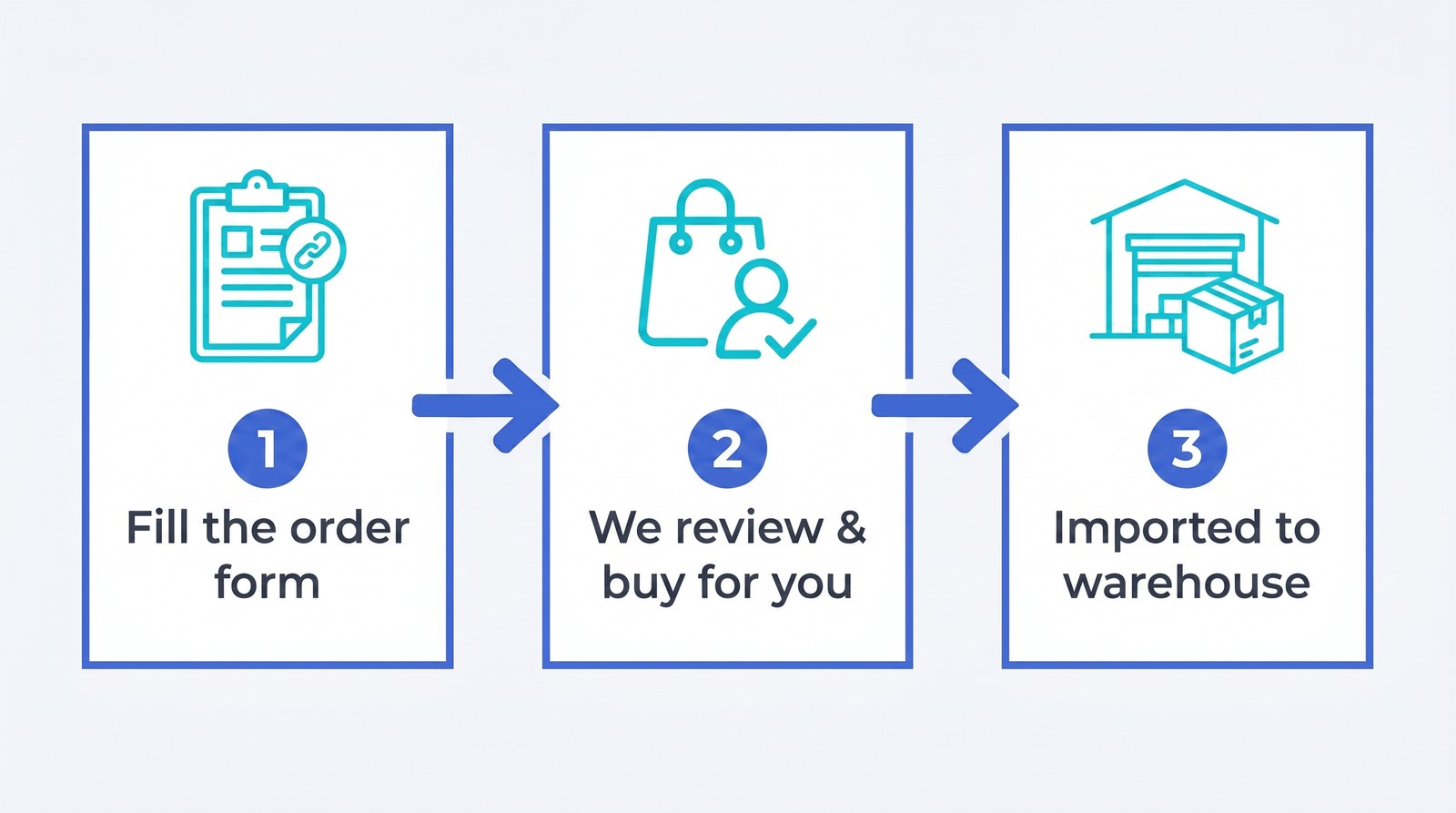
What sets Manual Purchase apart from Direct Payment is the scope of what’s handled for you. Where Direct Payment only handles the bank transfer (payment) sent to the seller, Manual Purchase has staff handle the actual product order itself. So it suits cases where “the whole ordering process is blocked,” rather than just “payment is blocked.”
Whose Account Is Used to Buy? 🪪
Manual Purchase uses a store account that Paysable owns by default. That means you can use it without a separate Korean account or identity verification.
- Use Paysable’s account (default): Since Paysable buys on your behalf using its own account, you can use the service even when signing up at the Korean store is difficult.
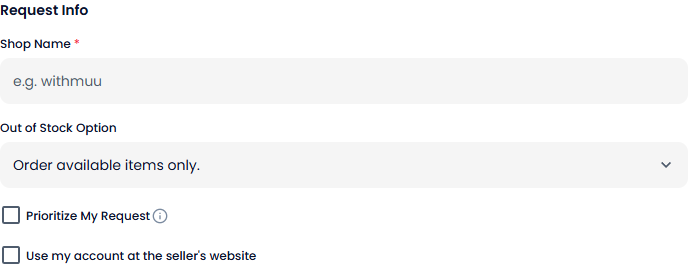
- Use my own account (optional): When you need your own account — for example, fan-club pre-sales — you can check “Use my account on the seller’s website” in the order form to request a proxy purchase through your account.
ℹ️ Note: If the product URL, price, or options you enter aren’t accurate, your order may be delayed. It’s best to include only one seller’s site per order. If you have a special request, such as entering a fansign or video-call event, add it to the order form.
In a Hurry? Prioritize Your Request ⚡
If timing matters for a release, you can select the “Prioritize My Request” option when ordering.
- Processing speed: With priority selected, the purchase is made within one business day.
- Fee: With priority, the service fee is applied at double the standard fee.
ℹ️ Note: Besides USD, you can choose your own currency for payment, such as CAD, AUD, or EUR. You can also apply any coupons or Paysable Credits you have at checkout.
3. Fees at a Glance 💳
Manual Purchase fees were simplified into four tiers after the renewal (April 2026). A flat per-transaction fee applies based on the item’s price range, and one thing stands out in particular: items over 300,000 KRW have no service fee.
Table 1. Paysable Manual Purchase fees (by item price range)
| Item price | Fee (per transaction) |
|---|---|
| Up to 10,000 KRW | 2,500 KRW |
| 10,001 – 100,000 KRW | 3,000 KRW |
| 100,001 – 300,000 KRW | 4,000 KRW |
| 300,001 KRW and above | Free |
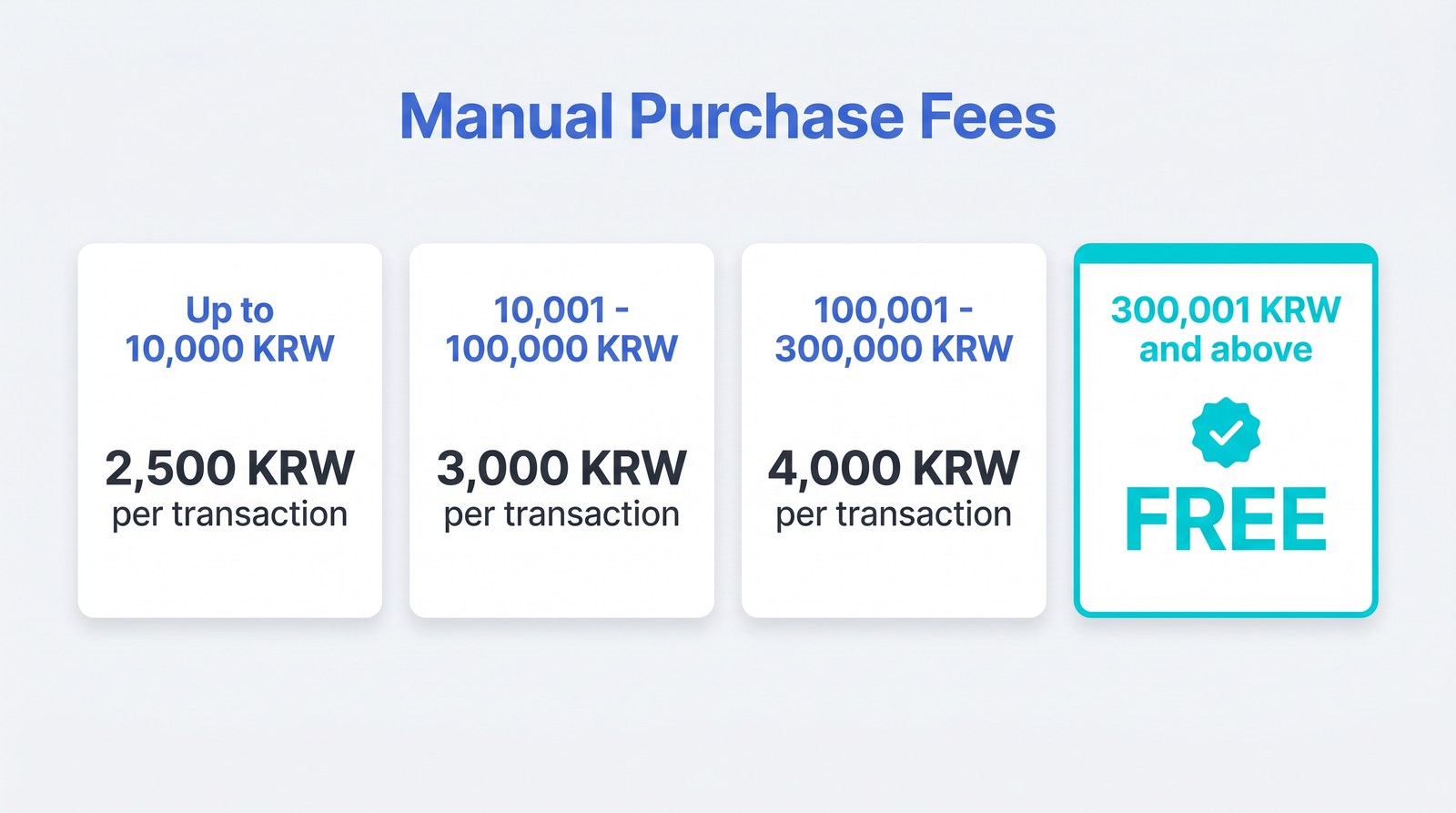
The simple structure makes it easy to estimate your total before ordering. For example, having a 20,000 KRW item purchased for you costs a 3,000 KRW service fee per transaction, while a higher-priced 350,000 KRW item has no service fee at all. In other words, the higher the item price, the lighter the proxy fee burden.
ℹ️ Note: Fees and policies may change. For the latest itemized rates, including the priority fee (double the standard), check the pricing page.
4. Warehouse Connection — Storage and Shipping in One Place 📦
The real value of Manual Purchase is that it doesn’t end at the purchase — it flows naturally into storage and shipping. Items that staff buy for you are imported straight to the Paysable Warehouse, ready to be sent overseas.
Up to One Year of Free Storage
Imported items are stored free of charge for up to one year. This is especially handy when you want to gather items released at different times and send them together. You can check stored packages anytime in your Package List.
Save on Shipping with Consolidated Shipping
Sending each item separately means paying shipping every time, but with Consolidated Shipping you can bundle several packages stored in the warehouse into a single box. Compared with sending them individually, this saves on shipping and simplifies tracking to a single number. You can choose carriers such as UPS, DHL, EMS, and K-Packet, and you can check a real-time estimate in advance with the Shipping Fee Calculator.
ℹ️ Note: While items are in storage, you can also choose optional services such as Package Check (photo/video), vacuum packaging, and customizing like album unsealing. Import and forwarding fees are charged per package.
If you’d like to browse several official Korean stores in one app, take a look at the Paysable Store guide, which works in the same flow.
5. When Manual Purchase Is a Good Fit 🎯
Manual Purchase isn’t needed for every purchase, but it’s an especially good fit in the following situations.
- When foreign payment or shipping is blocked: Buying from Korean stores that don’t support foreign card payment or international shipping.
- When the ordering process itself is complicated: When direct ordering is hard due to Korean identity verification, fan-club-only sales, Korean-only screens, and the like.
- When you want to hand off several items at once: When you’d like to bundle several products into a single request and have staff buy them for you.
On the other hand, when the item and amount are clear and you only need the bank transfer (payment) to the seller handled for you, Direct Payment is simpler. And for stores already available in the Paysable Store — such as Yes24, Bunjang, and Ktown4u — you can browse and order right in the store without going through Manual Purchase.
💡 Tip: If you’re unsure of the difference between Direct Payment and Manual Purchase, it helps to ask: “Do I just need the payment handled (Direct Payment)?” vs. “Do I need the whole purchase process handled (Manual Purchase)?”
When you’re ready, you can start Manual Purchase right below.
6. Frequently Asked Questions (FAQ) ❓
Q. Can I use it without signing up or verifying my identity at the Korean store?
A. Yes, you can. Manual Purchase uses a store account that Paysable owns by default, so you can use it without Korean phone verification or a Korean account. Only when you genuinely need your own account — such as for fan-club pre-sales — would you check “Use my account” in the order form. You can review the sign-up steps on the sign-up page.
Q. What’s the difference between Manual Purchase and Direct Payment?
A. Direct Payment has the system handle only the payment (bank transfer) sent to the seller, while Manual Purchase has staff handle the product ordering process as well. If the item and amount are set and you only need the payment, Direct Payment fits; if the ordering process itself is complicated or direct buying is blocked, Manual Purchase fits.
Q. I need an item urgently — can it be processed faster?
A. If you select the “Prioritize My Request” option when ordering, the purchase is made within one business day. With priority, the service fee is applied at double the standard fee. It’s useful for items where release timing matters.
Q. How do I receive the purchased item?
A. Items bought through Manual Purchase are imported to the Paysable Warehouse by default. After import, you send them to your overseas address through a separate shipping request. Imported items are stored free for up to one year, and at shipping time you choose which packages to send to your overseas address. Bundling several into Consolidated Shipping saves on shipping costs.
Q. How much are the fees?
A. The Manual Purchase service fee is 2,500-4,000 KRW per transaction depending on the item’s price range, and items over 300,001 KRW are free. The item cost and domestic shipping are separate, and warehouse import and international shipping fees are charged at the time you request shipping. You can check itemized rates on the pricing page.
7. Wrapping Up — Don’t Let “I Can’t Buy It Directly” Stop You 🎁
Just because you can’t order directly from a Korean store doesn’t mean you have to give up. A Korean shopping proxy service like Paysable Manual Purchase makes the following flow possible in one app.
- Korean products you can’t buy directly are purchased for you by staff
- Handled through Paysable’s account without a separate Korean account or identity verification (use your own account if needed)
- Easy cost estimates with a fee simplified into four tiers (2,500-4,000 KRW per transaction, free over 300,000 KRW)
- Save on both storage and shipping with up to one year of free storage + Consolidated Shipping
To avoid getting stuck on your next limited-edition, merchandise, or Korean-brand shopping run, it’s a good idea to sign up ahead of time.
For more questions, check the FAQ or reach out through a 1:1 Inquiry.